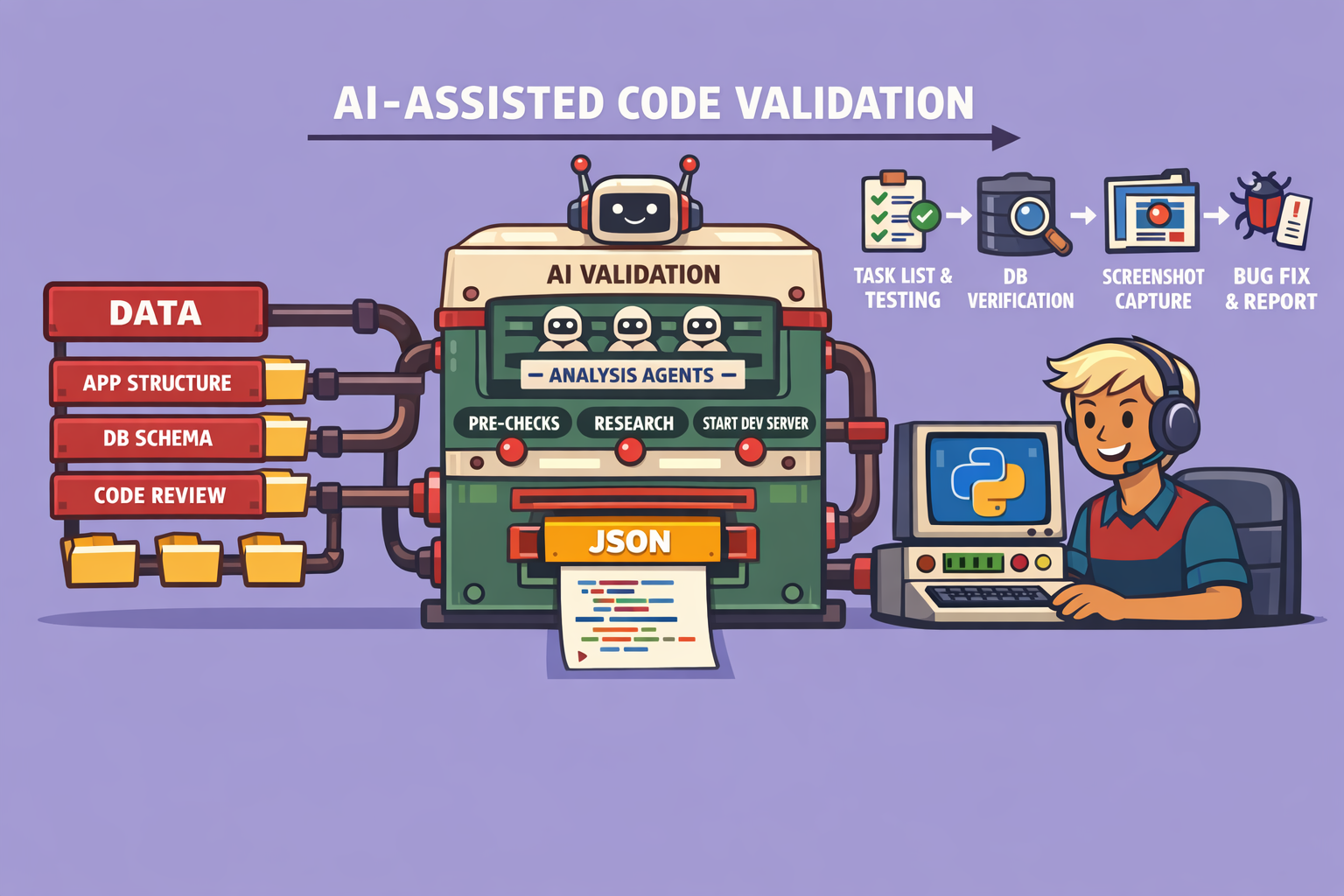
AI coding assistants have revolutionized the speed of code generation, but they often fall short in validating their own work effectively. This article introduces a “self-healing AI coding workflow” designed to automate and enhance the validation process for AI-generated code, ensuring applications are thoroughly tested as a user would experience them. This robust workflow helps delegate validation responsibilities to the AI agent, significantly reducing the manual burden on developers.
The Challenge of AI Code Validation
The rapid pace of AI code generation makes it nearly impossible for humans to keep up with thorough validation. Yet, the responsibility for AI-generated code unequivocally lies with the developer. This workflow aims to bridge that gap by empowering AI agents to perform comprehensive validation, identify and fix critical issues, and present a clear report of remaining problems. This not only lightens the mental load on developers but also drastically cuts down the time spent reviewing hundreds or thousands of lines of code.
Understanding the Self-Healing AI Coding Workflow
This workflow is structured into a command, ideally invoked via a tool that supports custom scripts or markdown-based instructions. It is designed to work with any codebase featuring a frontend, leveraging browser automation tools like the agent browser CLI. While specific to the chosen browser automation and database tools, the underlying principles are adaptable to other similar technologies.
How It Works: A Six-Step Process
The workflow is initiated by a command (e.g., /e2e test), triggering a sequence of six meticulously designed steps:
1. Pre-Requisite Check
- Frontend Requirement: The workflow primarily targets applications with a frontend, as it heavily relies on browser automation for user journey validation. Backend-only applications would require a different testing approach.
- Operating System Compatibility: Checks for OS compatibility (e.g., Linux or WSL for agent browser CLI).
2. Research Phase (Parallel Sub-Agents) This phase grounds the AI agent in the application’s context by having three sub-agents work in parallel:
- Application Structure and User Journeys: One sub-agent analyzes the codebase to understand its structure and how users typically interact with the application.
- Database Schema: Another sub-agent comprehends the database schema and overall data interaction, crucial for most full-stack applications.
- Code Review / Bug Hunting: The third sub-agent performs a static code review, identifying potential logic errors or vulnerabilities that might not be apparent through typical UI interaction.
- Context Compilation: The findings from these three sub-agents are then compiled to enrich the context for the primary agent, preparing it for comprehensive end-to-end testing.
3. Application Startup and Task List Definition
- Server Activation: The agent is instructed to start the development server, ensuring the application is fully operational and accessible.
- Task List Generation: Based on its research, the agent dynamically defines a task list. Each task represents a critical user journey (e.g., signing in, editing a profile, creating an item) specific to the application.
4. End-to-End Testing (Iterative Validation) This is the core of the workflow, characterized by a systematic, iterative approach (a “for loop”) through each user journey in the task list.
- Browser and Database Interaction: The agent utilizes a combination of the browser automation tool to navigate the frontend and direct database queries to validate backend operations (create, update, delete records). While specifically demonstrated with Postgres and Neon, this is adaptable to other database systems.
- Snapshot and Verification: For each interaction, the agent takes a snapshot of the UI to understand the current page state, then queries the database to verify backend changes. It interacts with UI elements (e.g., clicking buttons) and confirms the expected outcomes.
- Screenshots for UI/UX Validation: Throughout the process, screenshots are captured at key moments. These images serve a dual purpose: enabling the AI to analyze UI consistency and providing visual evidence for human review, ensuring that not only functionality but also the user experience is as intended.
- Issue Identification and First-Pass Fixing: If a user journey encounters a blocking issue, the AI agent attempts to fix the underlying code, retests, takes new screenshots, and re-validates in a loop. This “self-healing” aspect focuses on resolving critical blockers to allow the testing to proceed. Moderate or minor issues are typically logged for later human review or a subsequent AI-assisted session.
5. Responsive Testing After comprehensive end-to-end testing, a lighter pass is performed to ensure the application’s responsiveness across various devices (mobile, tablet, desktop).
6. Comprehensive Report Generation The final step is the generation of a detailed report, structured identically every time for consistency. This report includes:
- Fixed Issues: A list of all problems the agent identified and successfully resolved during the testing phase.
- Remaining Issues: A detailed account of moderate or minor issues, along with suggestions for how they might be addressed.
- Testing Summary: An overview of all user journeys undertaken and their outcomes.
- Optional Markdown Output: The report can optionally be outputted in Markdown format. This allows developers to easily carry forward the findings into a new AI agent session for further analysis and resolution, especially when the current context window is bloated with testing data.
Integrating into Feature Development
This workflow isn’t just for standalone audits; it can be seamlessly integrated into a feature development pipeline. When planning a new feature, developers can specifically instruct the AI agent to use this end-to-end testing skill after code implementation. This ensures that every new feature undergoes rigorous validation as part of the development cycle, performing regression testing and ensuring new code functions correctly and integrates well with existing components. While token usage can be considerable due to the depth of testing, the time saved and the quality gained far outweigh this cost.
Conclusion
This self-healing AI coding workflow is a significant leap forward in managing and validating AI-generated code. By delegating comprehensive testing to AI agents, developers can focus on higher-level problem-solving, confident that the foundational testing has been thoroughly addressed. The structured, iterative, and multi-faceted approach ensures that applications are robust, functional, and user-friendly, ultimately leading to higher quality software.
🔍 Discover Kaptan Data Solutions — your partner for medical-physics data science & QA!
We're a French startup dedicated to building innovative web applications for medical physics, and quality assurance (QA).
Our mission: provide hospitals, cancer centers and dosimetry labs with powerful, intuitive and compliant tools that streamline beam-data acquisition, analysis and reporting.
🌐 Explore all our medical-physics services and tech updates
💻 Test our ready-to-use QA dashboards online
Our expertise covers:
🔬 Patient-specific dosimetry and image QA (EPID, portal dosimetry)
📈 Statistical Process Control (SPC) & anomaly detection for beam data
🤖 Automated QA workflows with n8n + AI agents (predictive maintenance)
📑 DICOM-RT / HL7 compliant reporting and audit trails
Leveraging advanced Python analytics and n8n orchestration, we help physicists automate routine QA, detect drifts early and generate regulatory-ready PDFs in one click.
Ready to boost treatment quality and uptime? Let’s discuss your linac challenges and design a tailor-made solution!
Get in touch to discuss your specific requirements and discover how our tailor-made solutions can help you unlock the value of your data, make informed decisions, and boost operational performance!
Comments