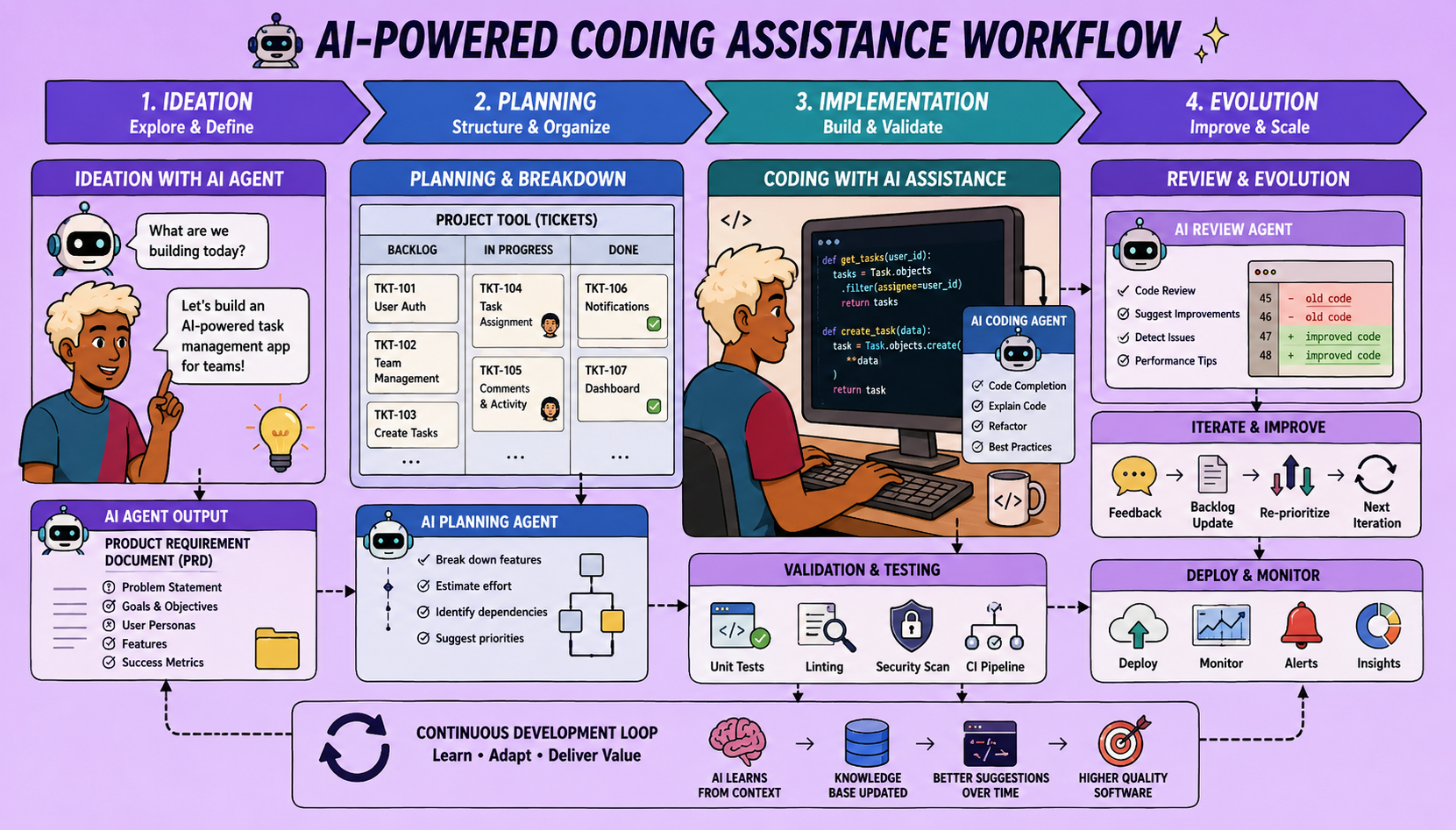
In today’s fast-evolving tech landscape, the role of an engineer is shifting. It’s no longer just about writing code, but about engaging in higher-leverage tasks like planning and validation. This article, based on a comprehensive workshop, demystifies AI coding assistance, offering a foundational, accessible system for reliable and repeatable results. Forget over-engineered frameworks; this approach focuses on core principles across three key phases: Ideation, Iteration (the PIV Loop), and System Evolution.
This methodology is designed to be adaptable, working with various tools like Claude Code, GitHub Copilot, Jira, Linear, or other work management platforms. The key is having a single place for work management and another for interacting with a large language model (LLM) to generate code.
The Three Phases of AI-Assisted Coding
Phase 1: Ideation with Coding Agents (For Product Managers & Developers)
The initial contact point for any project or sprint, this phase streamlines the planning process.
Step 1: The Brain Dump
Open your coding agent and simply start a conversation. Use a speech-to-text tool to articulate all your ideas for what you want to build or fix, being as specific as possible about features, bugs, tech stack, and architecture.
Step 2: Clarifying Assumptions
This is the most critical part. The goal is to reduce assumptions the coding agent might make. Crucially, instruct the agent to ask you clarifying questions, one at a time. Engage in this dialogue for 20-30 minutes, ensuring both you and the agent are on the same page regarding requirements. At this stage, maintain a high-level perspective, avoiding granular details about testing or file changes.
Step 3: Creating Your AI Layer (Optional but Recommended)
Once the high-level scope is clear, establish or refine your “AI layer.” This includes:
- Global Rules: Conventions your agent should always follow (coding styles, testing strategies, logging).
- Commands/Skills: Reusable workflows for frequently repeated prompts. If you find yourself typing a prompt more than three times, convert it into a command (e.g.,
/plan,/create-prd). These are essentially pre-defined procedures that invoke specific actions.
Step 4: Generating the Product Requirements Document (PRD)
- Command Execution: Use a command, such as
/create-prd, to transform the unstructured conversation into a structured PRD. This command guides the agent to produce a document outlining executive summary, mission, target users, and in-scope features. - Review and Iterate: Review the generated PRD. Don’t immediately proceed; human validation is crucial. Iterate with the agent if necessary, refining the document to ensure alignment.
Step 5: Creating Jira Tickets (or GitHub Issues)
- Command Execution: Once the PRD is finalized, run a command like
/create-stories(or similar for other platforms). This command parses the PRD and automatically creates individual tasks or issues in your chosen work management system (e.g., Jira, GitHub). The command can also automatically assign developers or add relevant context.
Live Demonstration Example: Imagine building a “Poll Builder” application. In Phase 1, you’d brainstorm features like a live presentation mode, QR code generation, multi-question polls, and multi-choice options with the agent. The agent would then ask clarifying architectural or feature-specific questions. After refining, the PRD would be generated, followed by automatically populated Jira tickets, each potentially enriched with technical notes from the agent’s research.
Phase 2: Building Iteratively with the PIV Loop (For Developers)
Once tickets are created, developers pick one and enter the PIV (Plan, Implement, Validate) loop.
Step 1: Load Project Context with a “Prime” Command
Start a fresh conversation with the coding agent. Execute a /prime command, providing the ID of the Jira issue (or GitHub issue) you’re tackling. This command instructs the agent to:
- Pull specific context from the issue using your work management system’s API.
- Analyze the entire codebase, including app routes, features, and recent Git commits (Git logs serve as long-term memory for the agent).
- The prime command is customizable to control the amount of context loaded, preventing the agent from being overwhelmed.
Step 2: Unstructured Exploration
Engage in a free-form conversation with the agent. Ask it to explore solutions, propose architectures, and research technical concepts relevant to the specific ticket. Here, you can leverage sub-agents for deeper, token-efficient research, summarizing vast amounts of information before reporting back to the main agent. This helps in managing context effectively.
Step 3: Structured Planning
Once confident in the approach, invoke a /plan command. This will generate a structured markdown document for the implementation plan, similar to a PRD, but focused on code-level details. This plan includes:
- Summary and User Story
- Established Decisions (from the exploration phase)
- Implementation Patterns and Recommended File Changes
- Detailed Task List for the agent
- Self-Validation Strategy: Crucially, this section outlines how the agent should validate its own work, including running unit tests, integration tests, linting, and type checking. It can even involve end-to-end testing with browser automation tools.
Step 4: Implementation and Validation
- Fresh Session: Start another brand new session with the coding agent. This ensures the agent is focused and unbiased by prior conversations.
- Execute Command: Run an
/implementcommand, pointing it to the.mdplan file generated in the previous step. - The agent will then:
- Read the plan.
- Create a new Git branch.
- Walk through the task list, writing code.
- Execute all defined self-validation steps (testing, linting, etc.).
- Update the Jira ticket (e.g., setting status to “In Review,” leaving comments with implementation details).
- Human Review: Crucially, engineers must review the code and conduct manual testing before merging to the main branch. This human-in-the-loop approach maintains quality and control.
Live Demonstration Example:
For the “Presenter Projection Page” ticket, the developer would prime the agent with the issue, then explore how to integrate real-time data and animated charts. The agent might even point out dependencies, like needing the QR code generation first. The /plan command would detail file changes, coding patterns, and define tests. Finally, the /implement command would execute the coding, testing, and update the Jira ticket.
Phase 3: System Evolution (Continuous Improvement)
After each PIV loop, especially when issues arise, seize the opportunity to improve your AI-assisted coding system.
Process:
- Identify Root Causes: If a bug or suboptimal code is produced, don’t just fix the code. Ask the agent to analyze its own AI layer (rules, commands, skills, workflows) to identify why the issue occurred.
- Update the AI Layer:
- Commands/Skills: Refine existing commands or create new ones to prevent similar issues. This is highly leveraged; one improvement can save hours of future work.
- Global Rules: Update style conventions, validation methodologies, or other organizational standards.
- On-Demand Context: Optimize documentation (e.g., Confluence pages) for AI understanding.
- Templates: Refine PRD or plan templates to address recurring gaps.
- Collaborative Improvement: Since your AI layer (commands, rules) is stored like code, it can be checked into version control. This allows for pull requests, code reviews, and standardization across the team, formalizing the evolution of your AI-assisted development process.
This continuous feedback loop ensures that your AI coding system becomes increasingly reliable and tailored to your specific codebase and development practices over time.
Conclusion
This foundational system proves that effective AI coding assistance doesn’t require overly complex frameworks. By embracing a structured approach to ideation, iterative development with precise planning, and continuous system evolution, engineers and product managers can significantly boost productivity, reduce boilerplate tasks, and maintain control over the software development lifecycle. The days of being a “Stack Overflow warrior” are behind us; it’s time to delegate coding to AI and focus on the strategic aspects of building great software.
🔍 Discover Kaptan Data Solutions — your partner for medical-physics data science & QA!
We're a French startup dedicated to building innovative web applications for medical physics, and quality assurance (QA).
Our mission: provide hospitals, cancer centers and dosimetry labs with powerful, intuitive and compliant tools that streamline beam-data acquisition, analysis and reporting.
🌐 Explore all our medical-physics services and tech updates
💻 Test our ready-to-use QA dashboards online
Our medical physics SaaS is coming soon — designed for radiation therapy, imaging, and nuclear medicine centers.
Our expertise covers:
🔬 Patient-specific dosimetry and image QA (EPID, portal dosimetry)
📈 Statistical Process Control (SPC) & anomaly detection for beam data
🤖 Automated QA workflows with n8n + AI agents (predictive maintenance)
📑 DICOM-RT / HL7 compliant reporting and audit trails
Leveraging advanced Python analytics and n8n orchestration, we help physicists automate routine QA, detect drifts early and generate regulatory-ready PDFs in one click.
Ready to boost treatment quality and uptime? Let’s discuss your linac challenges and design a tailor-made solution!
Get in touch to discuss your specific requirements and discover how our tailor-made solutions can help you unlock the value of your data, make informed decisions, and boost operational performance!
Comments