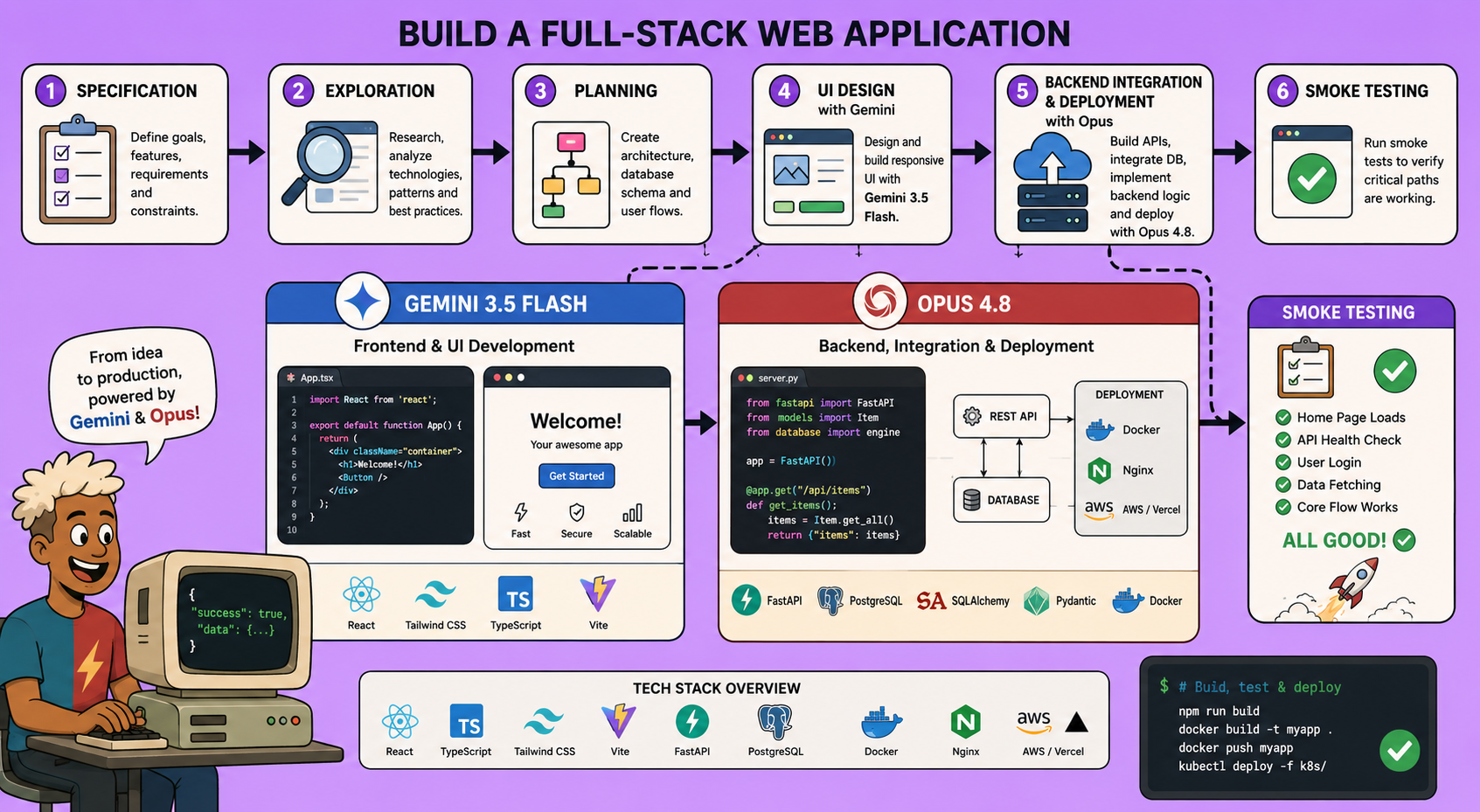
Google recently released Gemini 3.5 Flash – a cheap, incredibly fast LLM that produces stunning user interfaces, often indistinguishable from human-designed pages. Almost simultaneously, Anthropic launched Opus 4.8, a reasoning powerhouse that excels in long-horizon agentic engineering tasks. You might think you have to choose one for your AI coding workflow, but there’s a much better approach: combine them.
This article walks you through a workflow that mixes these two models to create full-stack web applications. Gemini 3.5 Flash handles the UI design (where it shines), while Opus 4.8 manages planning, content integrity, and back-end integrations. The result? Beautiful, functional apps built in a single pass, at a fraction of the cost.
Below, I’ll explain the reasoning behind this multi-provider strategy and then give you a step‑by‑step guide to implementing it yourself.
Why mix providers?
Strengths and weaknesses
- Gemini 3.5 Flash produces beautiful, modern interfaces from a single prompt – often better than Claude or Opus. But its page content and factual accuracy can be hallucinatory.
- Opus 4.8 is stronger at reasoning, planning, and ensuring that integrations (databases, APIs, authentication) work correctly. Its UI skills are weaker, and when it tries to design, the result is usually worse.
Cost efficiency
Gemini 3.5 Flash costs about $1.50 per million input tokens, while Opus 4.8 is much more expensive. By letting Gemini handle the token‑heavy UI generation and Opus handle the lighter planning/reasoning steps, you save significantly.
Separate sessions for focus
Each step in the workflow runs as its own coding‑agent session. This allows you to:
- Switch providers mid‑workflow (impossible in a single conversation).
- Keep each session single‑task, preventing model overload.
- Easily test different model combinations (e.g., Gemini for exploration, Opus for planning).
The key enabler is document‑based handoffs: each session writes a Markdown summary that the next session reads as input.
Step‑by‑step workflow
0. Prepare a specification document
Start with a clear spec file (spec.md) describing the full application. You can write it yourself or have an AI coding agent help you. An example is included in the linked repository.
1. Exploration (with Claude Sonnet)
Goal: Understand the repository and requirements, produce a context document.
- Open a new coding‑agent session (e.g., Claude Code with Sonnet).
- Use the frontend‑mix‑explorer skill.
- Provide the path to your
spec.md. - The session outputs
context.md– a summary of the repository state, recommended frameworks, brand elements, environment variables, and data layer.
Why Sonnet? You don’t need maximum reasoning here; Sonnet is fast and cheap.
2. Planning (with Opus 4.8)
Goal: Create a detailed plan covering content, integrations, and deployment.
- Start a new coding‑agent session with Opus 4.8.
- Use the frontend‑mix‑plan skill.
- Provide the path to
context.mdfrom step 1. - Opus outputs
plan.mdwith three sections:- A. Content & UI purpose – tone, message, not structural details (to avoid overriding Gemini’s UI talent).
- B. Integration scope – APIs, database models, authentication.
- C. Deployment plan – platform (e.g., Vercel, DigitalOcean) and automation.
3. UI Design (with Gemini 3.5 Flash)
Goal: Build the entire user interface from the plan’s content section.
- Open a new session in a Gemini‑compatible agent (e.g., Pi with OpenRouter, or Antigravity).
- Set the model to
gemini-3.5-flash. - If using a coding agent that supports skills (like Pi), call
frontend‑mix‑designand give it the path toplan.md. Otherwise, copy the skill’s instructions and the plan path into the prompt manually. - Gemini generates the UI and outputs
ui_summary.md– a concise description of the UI structure for later steps.
Note: Omitting structural instructions to Opus ensures Gemini has full creative freedom.
4. Integration & Back‑end (with Opus 4.8)
Goal: Build APIs, databases, authentication, and any server‑side logic.
- Start a new Opus session.
- Use the frontend‑mix‑integrations skill.
- Provide both
plan.mdand the latest handoff (e.g.,ui_summary.md) as input. - Opus writes the integration code according to the plan.
5. Validation & Testing (with Sonnet + Opus)
Goal: Run unit tests, static analysis (e.g., SonarQube), fix issues.
- Use a separate Sonnet session to execute pre‑defined tests.
- Pass any failures back to Opus for corrections.
6. Deployment (with Opus)
Goal: Deploy the application to the target platform.
- Opus reads the deployment section from
plan.mdand executes it (e.g., via MCP or scripts).
7. Smoke Test (with any agent that has browser‑automation)
Goal: Verify the deployed app works end‑to‑end.
- The agent uses a browser tool to click through the UI, checking functionality.
Putting it all together
Each step is a separate session. You run them sequentially, passing the handoff documents as parameters. The repository linked in the video description contains:
- All skill files (for Claude Code, Pi, etc.)
- A sample
spec.mdfor a “Deep‑Space Catalogue” app - Artifacts showing every handoff document from a complete run
You can either execute the steps manually or use an orchestrator like the open‑source Archon workflow, which automates the entire pipeline.
Key takeaways
- Multi‑provider workflows unlock the best of each model.
- Separate, focused sessions prevent cognitive overload and make debugging easy.
- Document handoffs enable a clean chain of communication between agents.
- This approach works for MVPs, proofs‑of‑concept, and even moderately complex full‑stack apps.
Give it a try – even if you only borrow the concept of mixing providers, you’ll see a dramatic improvement in both UI quality and architectural soundness.
🔍 Discover Kaptan Data Solutions — your partner for medical-physics data science & QA!
We're a French startup dedicated to building innovative web applications for medical physics, and quality assurance (QA).
Our mission: provide hospitals, cancer centers and dosimetry labs with powerful, intuitive and compliant tools that streamline beam-data acquisition, analysis and reporting.
🌐 Explore all our medical-physics services and tech updates
💻 Test our ready-to-use QA dashboards online
Our expertise covers:
🔬 Patient-specific dosimetry and image QA (EPID, portal dosimetry)
📈 Statistical Process Control (SPC) & anomaly detection for beam data
🤖 Automated QA workflows with n8n + AI agents (predictive maintenance)
📑 DICOM-RT / HL7 compliant reporting and audit trails
Leveraging advanced Python analytics and n8n orchestration, we help physicists automate routine QA, detect drifts early and generate regulatory-ready PDFs in one click.
Ready to boost treatment quality and uptime? Let’s discuss your linac challenges and design a tailor-made solution!
Get in touch to discuss your specific requirements and discover how our tailor-made solutions can help you unlock the value of your data, make informed decisions, and boost operational performance!
Comments